Leia Ruffini
3 November 2026
Designing a better future: your guide to design contribution in Open Source
Open source powers our smartphones, banks, and the infrastructure that makes our digital world tick. And yet, it remains a somewhat gated community reserved for the technically specialized. If you’re a designer who doesn’t speak in technical documentation or terminal commands, it can feel very daunting, not knowing where to start.
Yet open source desperately needs specialized non-tech professionals: without design and UX, even the most powerful tool risks being clunky and unusable, missing the opportunity to gather enough users to become a viable alternative to paid or closed-source counterparts.
In this article, I will go over why design matters in open source, how to get involved and meaningfully contribute as a designer in open source projects, and highlight some specific areas in which designers can make a bigger impact in open source software.
Design, Open Design, and why it matters
What is design?
Given the broad nature of the term “design”, it is important to clarify its meaning within this article’s context. In the software industry, “design” is typically understood in one of two ways. When used by developers, it usually refers to the process of defining a system’s intended technical or hardware behavior. And when thinking of the ‘non-technical’ interpretation of design, it is often limited to visual design, encompassing elements like logos, typography, and illustrations. However, the scope of design is much broader than logos, fonts, and pictures: instead, it covers a much wider collection of practices, including user research, user experience design (UX design), and user interface design (UI design).
User research
User research examines the intersection of a tool and its audience to provide essential context on user behavior and needs. User testing is one of the most well-known aspects of user research, but it is a vast field of activity. Methods are generally categorized into two pillars: quantitative research, which gathers broad data points across large user groups or amounts of activity; and qualitative research, which captures more complex information from individual experiences. Overall, user research looks into when and how users interact with a tool, where issues appear, and what causes them.
UX design
UX design focuses on the user’s experience to ensure they can achieve their goals with the least amount of friction. This requires a deep understanding of the target user base and their needs, which are then mapped out into distinct user journeys to determine the best ways to support these end users. UX designers typically examine the complete ecosystem surrounding a tool, including its documentation, the environment it operates in, and the entire user flow from initial contact to post-use.
UI design
UI design is sometimes mentioned together with UX, but can also be separated. UI design focuses more on the layout and workings of a tool’s interface. If UX defines what buttons should exist and where they should be, then UI design defines how the buttons will look and how the interaction with the button will feel, animation and all. UI designers build composable design systems, collaborating with developers to build interfaces.
The impact of design
As mentioned in the introduction, most people outside of tech have never heard of open source alternatives. As a result, they miss out on tools that can be more affordable, flexible, and aligned with different expectations around privacy and control. If we want greater control over the tools we rely on, we need broader participation in open source, supported by software ecosystems that are inclusive, intuitive, and approachable.
This is where design comes in. The impact of user research, UX, and UI design is clearly reflected in a tool’s adoption rate and the quality of the experience it provides. Studies have shown clear evidence of the value of investing in design, with companies prioritizing UX seeing significant increases in user adoption, in some cases of up to 200%. In addition, the aesthetic-usability effect shows that visually refined interfaces are perceived as more usable and trustworthy, making users more tolerant of minor issues.
By elevating the design quality and visibility of projects like Penpot, Matrix, OpenStreetMap, Collabora Online, Home Assistant, and many, many more, we can do more than just improve software. We can build the level of trust and usability required for open source to become a credible, mainstream choice alongside proprietary solutions.
What is holding us back, and how to move forward
Given the clear benefits of design and the urgent need for designers, why is their participation in open source still so limited? And why do project maintainers rarely ask for anything more than a new logo? We surveyed designers and maintainers of open source projects to better understand this problem, and the answers we got point to a significant awareness gap.
We kept hearing two major problems in our survey. The first was that designers don’t always know which projects require their skills (or even how open source works in some cases). The second was that maintainers are unfamiliar with what design can do, or where to ask for help on that front. These barriers are compounded by deeper structural issues: limited access to relevant project information and a lack of tooling supporting design collaboration between maintainers and designers. With the vast majority of open source projects managed and shared on GitHub, it is difficult for designers and maintainers to find and exchange the information needed for meaningful collaboration.
What is Open Design
This is precisely why the Open Design movement exists. Its goal is to integrate the full spectrum of design expertise into the open -source ecosystem. Open designIt aims to:
- Bridge the gap: Create clear pathways that match eager designers with projects in need of their skills.
- Simplify engagement: Build the resources and streamlined processes necessary for designers to contribute without friction.
- Enhance collaboration: Foster a culture of open feedback and direct communication between designers and developers.
- Advocate for value: Promote design literacy in Open Source, and how to actively participate in shaping the future.
Just as open -source code thrives on transparency and collective effort, so must design. By treating design with the same openness as code, we can unite users, contributors, and maintainers, regardless of their technical background.
As designers, we are trained to bridge gaps. By identifying user needs and removing the barriers we have identified, we can ensure Open Source evolves on a truly user-centric foundation.
How to contribute to open source as a designer
Having established how much designers can bring to oOpen sSource, we can now look at some concrete steps to start your contribution journey.
The next sections provide a straightforward framework to help you get started immediately. If you are interested in reading more about Open Design, I included a list of helpful resources at the end of this article for easy referencing. Make sure to check it out!
Step 0: Understand what a contribution is
Understanding what counts as a contribution can be challenging if you’re new to open source. Many people assume a contribution must be a tangible “thing”, like a pull request, a feature, or a visible asset. For non-code contributions, the examples usually centre on translation, documentation, or logo design. These are essential and deeply valued, but they are far from the full picture.
For design contributions in particular, some can be more meta in nature. They help teams better understand their users or improve how a project evolves. Research reports, usability findings, or flowcharts that map out a smoother onboarding experience can all shape the direction and quality of a project in meaningful ways.
There is also something to be said about “intangible” contributions. You don’t need to produce an artefact or modify a file to make an impact. A contribution can simply be the effort to solve a problem, improve collaboration, or bring people together around a shared goal. In my day job as a designer at Canonical, I see an entire category of work that isn’t always seen as “real work,” despite having significant influence. Asking thoughtful questions; reviewing someone else’s work; organizing a meeting to unblock an issue – these actions move projects forward.
It’s important to note that this kind of contribution is rarely listed explicitly on project platforms. More often, you discover these opportunities through conversations with the people involved. That can feel a little nerve-wracking at first, but open source is fundamentally about community. Most contributors are genuinely happy to share what they’re working on and how you can help.
Step 1: Understand the tools
While there are thousands of open source projects welcoming contributions — and many different ways maintainers seek support — the vast majority host their work on GitHub. For people without a coding background, getting comfortable with GitHub is often the biggest hurdle. It’s a platform designed primarily with developers in mind, which can make it feel complex or intimidating at first. However, investing some time to understand how it works can make a huge difference and significantly lower the barrier to contributing.
If you’re just getting started, it’s worth exploring a few introductory resources. We’ve created a video that goes over the basics of Git and GitHub, helping you understand the core workflows and concepts. GitHub also offers a concise explanation of how Git and GitHub function, along with practical walkthroughs that demonstrate how to contribute to a project. Even though many of these examples focus on code, the underlying processes are the same for design and other non-code contributions.
Step 2: Finding a project
Finding a project to contribute to can be really tricky, especially when looking for design contribution opportunities. A good place to start is with tools or projects you already use and understand. Familiarity makes it easier to check what resources are available and offer help.
Alternatively, you can browse issues aggregators like contribute.design, a website that lists projects that are open to design contributions. You can also go to opensourcedesign.net to discover more projects in need of design help.
As mentioned earlier, open source projects don’t often have explicit pointers for design tasks available. In many cases, directly reaching out to people involved in a project will be the best way to check whether or not there is an opportunity there.
Step 3: Understand the project
Once you’ve chosen a project, take some time to understand its requirements, guidelines, and go through the open issues. Not every project provides the same level of detail, but you can usually find what you need on its website or GitHub page. Try to click around and see what you can discover.
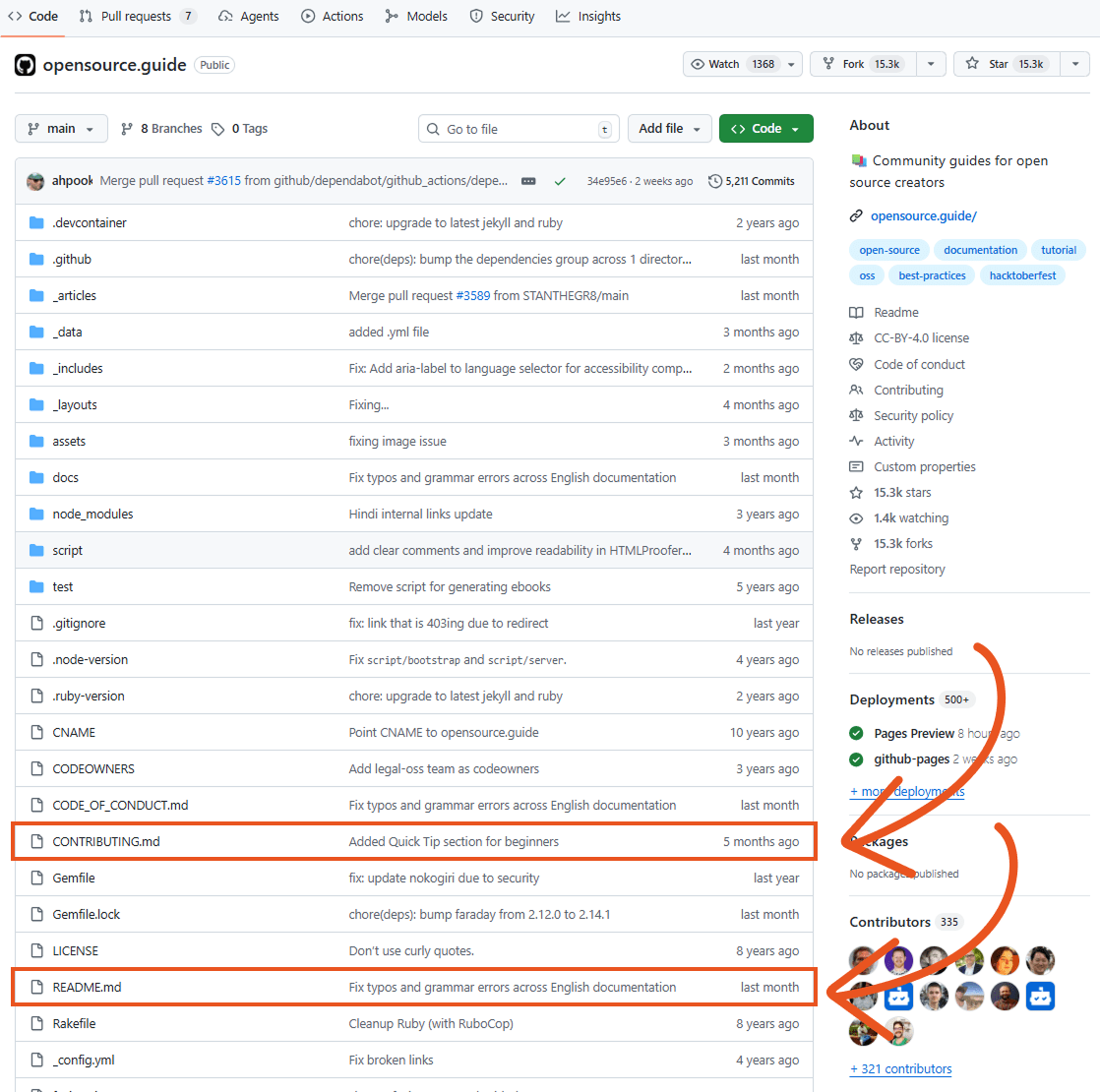
Most projects on GitHub include a README file, and often a CONTRIBUTING.md as well. These are the key documents to start with. They’ll help you understand how to contribute, provide useful context about the project and its users, and point you towards any existing resources like past mockups or design guidelines.
If you don’t find much relevant information in these files or elsewhere, that can actually be an opportunity. You can step in and help fill those gaps. As mentioned earlier, one of the biggest barriers to design contributions in open source is that maintainers may not fully understand the value of design. As a result, many projects don’t prioritize it or lack clear design processes altogether. While this might seem like a drawback, it’s actually a great chance to make an impact. As a designer, you can help improve the onboarding experience by introducing simple design checklists or enhancing documentation. If a project has no design guidelines or issues, think of it as a blank canvas and propose ways to get started.
To support this, we’ve created a brief that helps describe open source projects from a designer’s perspective. It’s meant to give maintainers a clearer idea of what designers need before getting started, while also helping designers quickly find the information they need to contribute effectively. Feel free to explore it and give us feedback!
It’s also worth looking closely at the contribution process itself. It’s often more complex than expected, and design input can make a real difference here. Many contributors have pointed out that design contributions and reviews can be particularly challenging.
We have even experienced this ourselves at Canonical: for complex projects like our own design system libraries and component framework, the way to contribute is not always obvious.
And when you do contribute, it should be in line with the standards and guidelines that the project requires. Take our design system, Vanilla, for example: anyone can contribute, but we have a developing contribution process that outlines critical requirements for how and when to submit changes, how to describe them, and how to make them more accessible to the wider community. Feedback on this process is always welcome!
And again, don’t hesitate to reach out to project maintainers and share your ideas. Most people are open to discussion, and if one project isn’t responsive, there are plenty of others. You can usually find contact details within the project. It’s also helpful to connect with regular contributors, as they’re often a great source of insight. Since open source work is largely volunteer-based, responses may take time, so reaching out to multiple people can help.
Step 4: Contribute to the conversation or create a new issue
There are generally two ways to contribute your design skills: you can either work on an existing design-related issue, or create a new one with your own proposed solution.
To do this, head to the project’s “Issues” tab. From there, you can filter open issues to find ones that need design input. This makes it easier to identify tasks you can jump into right away. Keep in mind that not all projects maintain well-organized backlogs, so if the labeling system is unclear, it’s worth browsing through the issues more broadly.
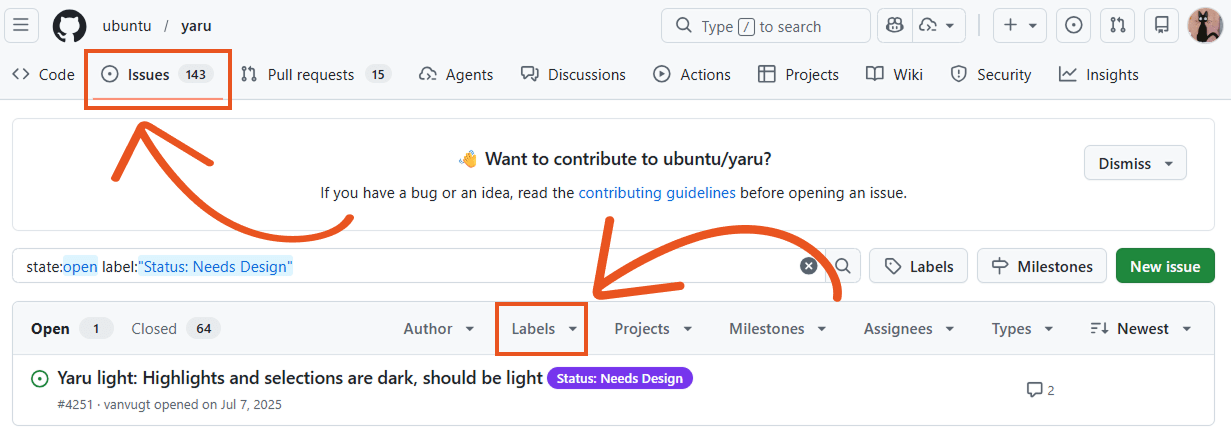
If you have an idea or suggestion and don’t see an existing issue for it, you can create a new one. While it might feel intimidating, especially in projects with strict contribution guidelines, it’s usually better to contribute something than to hold back. Open source communities tend to be welcoming, and sharing your thoughts is valuable.
In some cases, instead of (or alongside) opening an issue, you may be asked to fork the repository and submit a Pull Request (PR). While this can sound complex, the concept is straightforward: since you can’t directly edit the main project, you create your own copy (a fork), make changes there, and then submit those changes back to the original project through a PR. This allows maintainers to review your work and decide whether to merge it into the main codebase.
Whether you’re contributing to an existing issue or creating a new one, it’s important to clearly explain the problem you’re addressing and why it matters. You don’t need perfect data or extensive documentation. You only need to make sure the issue and its impact are easy to understand. Even if you already have a solution in mind, don’t skip defining the problem first: it helps others to see how your idea fits with ongoing efforts and to evaluate it more effectively.
Whenever possible, include evidence to support your design decisions, and stay open to feedback. If you’re new to the project, there’s a good chance you’re missing some context. That is completely okay. Sharing your idea is just the first step in a collaborative process!
Step 5: Keep exploring
Besides the sites like contribute.design and opensourcedesign.net, you can use GitHub explore page to find more projects. You can browse even more potential projects and search by:
- Topics: browsing repos by project tags such as frontend, design, font, and much more.
- Trending: see what repos are peaking with popularity. High activity often means active maintainers and users looking for better UX!
- Collections: curated list of projects that fall under the same topics, communities and industries. For example: web accessibility, ReactUI, and atomic design collection of projects.
You can also check out the names of projects attending events like FOSS Backstage or FOSDEM to find active communities and projects.
What to contribute
Now that we covered how contributions work, let’s dive into some specific areas where design help always makes a difference.
It’s easy to feel like you need a deep understanding of a project before you can contribute. Understanding the context of the project and making sure you are making efforts to learn more is important, but you don’t have to be an expert to make a meaningful impact. There are several areas where design support is almost always needed, and where you can get started with little to no prior knowledge of the project.
Nearly every open source project can benefit from clearer descriptions that better communicate its purpose, smoother onboarding experiences that help newcomers find their footing, more helpful and human-centred error messages, and more intuitive navigation. The following sections explore practical ways you can contribute to each of these areas.
Project description and contribution, or helping clarify purpose and goals
The first area is the project description. It is particularly important in open source, because it acts as the main entry point for both users and potential contributors. This means it needs to speak to two audiences with different motivations and expectations. At its core, a strong project description clearly communicates the project’s value: what problem it is trying to solve and why it matters.
This is one of the most overlooked and yet impactful ways to help a project grow its community. Taking the time to understand how maintainers and existing contributors describe the project can reveal important gaps or opportunities for improvement. Interviewing them to gather their perspectives is often a valuable first step. You can use structured guides or develop your own approach. Don’t hesitate to keep asking questions until you can build a clear and compelling case for why to contribute, and how.
It’s also important to evaluate how easy it is for someone to start contributing. Is it obvious where contributions are needed? Is the review process transparent, including who reviews work and what criteria they use? Do newcomers know where to go if they get stuck? Improving clarity around these questions can significantly lower the barrier to participation.
Onboarding, or beginner’s guide to success
Next comes onboarding. The first-time user experience is crucial, as new users are often met with a blank slate. Make this as accessible as possible, and use empty states to provide guidance and clear instructions. Think about what they need to do to get value from your project. Maybe they need to import some data? Fill in some forms? Put yourself in their shoes and try to think of ways that make it easier to get started.
As someone new to the project, you’re in a strong position to contribute meaningfully here. You don’t carry the same assumptions as long-time contributors, which allows you to spot gaps more easily. Don’t hesitate to ask seemingly “silly” questions! They often highlight things others have simply grown used to or forgotten were once confusing.
It’s also helpful to talk to contributors about the projects they use most and how they built them. Look for standout examples that showcase the tool’s strengths, and try to understand the steps involved in creating them.
Feedback, or guiding users through problems
Feedback is essential for users to know what is going on, and error messages are a very important type of feedback. They make the difference between a long-time user and someone who will quit after the first hurdle. When building a product, think carefully about the problems users might encounter and how you can help them resolve those issues. Pay attention to your own first experience with the project. What felt unclear? What guidance would have helped, and at what point? Those insights are incredibly valuable.
Do not only focus on the “happy path”, where everything works. Consider what happens when things go wrong, like entering the wrong password or forgetting to fill in an important field. In many cases, issues can be prevented altogether, but when they can’t, your error messages should clearly explain what went wrong and how to fix it. It’s also important to provide a way for users to revisit notifications or messages that might otherwise disappear, so they can troubleshoot even hours or days after they encountered a bug or issue.
Navigation, or showcasing the important bits
Finally, let’s talk about navigation. Navigation is not just about menus and dropdowns; it is about how users find what they need and go about accomplishing their goals. If you want to improve navigation, you really need a clear understanding of your users: who they are, what they need, and what they are used to. This will help you map the steps they’ll take to reach their objectives.
Whether users are searching for a specific article or piece of documentation, or trying to understand what actions are possible, the goal is to help them reach their destination efficiently, with as few steps as possible, without creating confusion.
Observing real users during testing can reveal insights into how your flows should be structured. You can also use techniques like card sorting to organize actions and topics in ways that resonate with the people using your tools.
Ask to spend time with someone familiar with the project and watch how they work. Pay attention to nested menus, common keyboard shortcuts, and any hidden features or confusing paths that could be streamlined.
What else?
This article didn’t cover translation and documentation, but these are also key areas that need contributions. If you want to learn more about documentation in particular, our colleagues on the documentation team have put together a set of guidelines and a curated board for finding documentation issues. The majority of projects linked on the board are Canonical projects, but is looking to expand to more projects outside of Canonical in the future.
Do consider the impact of giving feedback, answering to new joiners and organizing in-person meetups and events. While these aren’t strictly design tasks, they’re areas where designers often have great skills to share!
That’s all there is to it
There are no credentials or specific knowledge requirements to contribute, and there is no harm in trying. Open source thrives on engagement, and a lack of involvement is far more detrimental than any single mistake. Your involvement, even if you are a beginner, is always a net positive contribution. If a project doesn’t have a clear way to contribute to it, view it as an opportunity to help set up good foundations for future contributions. There is no progress made if no one dares to jump in!
As they say on Game Changer, “The only way to learn is by playing. The only way to win is by learning. And the only way to begin is by beginning!”
Resources to check out
We covered a lot in this post, so here is a table linking some helpful resources to read next.
| Resources | Description |
| Introductory Resources | |
| Video: Git Gud: An introduction to Git and GitHub for Absolute Beginners | Explores core Git and GitHub workflows and concepts to help you get comfortable with the tools. |
| Video: A brief introduction to Git for beginners | GitHub | Offers a concise explanation and practical walkthroughs on contributing to a project. |
| Finding Projects | |
| contribute.design | An issues aggregator that lists projects actively open to design contributions. |
| opensourcedesign.net | A resource to discover more projects in need of design help. |
| FOSS Backstage event | Check the names of attending projects to find active communities. |
| FOSDEM event | Check the names of attending projects to find active communities. |
| Canonical Open Documentation Academy board | A board for finding documentation contribution opportunities. |
| Template and design guides | |
| Brief: Describing open source projects from a designer’s perspective | Template for maintainers to describe their project so designers can find relevant information and get started quickly. |
| Open Design Guide | A website gathering advice on how to get started in Open Source for designers. |
| Canonical Open Design | A resource for maintainers and designers to work better together. |
| Canonical Design System Examples | |
| Vanilla Core Component Library | Canonical Figma library. |
| Vanilla Framework | Canonical component framework. |
| Vanilla design proposal guidelines | Example of design contribution process. |
| Community Contribution Examples | |
| Video: Gephi Lite: We Built a Data Visualization Tool, But We Couldn’t Design It | FOSDEM 2026 | A FOSDEM talk showcasing the impact of design contribution in Open Source. |
| Video: Unlocking open source potential with user experience | Ubuntu Summit 25.10 | An Ubuntu Summit talk describing areas where design help is always needed. |
Join the Canonical design team
We’re looking for designers who care about craft and how systems work under the hood. At Canonical, design sits at the intersection of UX, engineering, and open source where we shape cohesive, accessible experiences across cloud, desktop, and IoT products.
If you enjoy solving complex problems and turning technical depth into clarity, explore our open roles on our career pages.