
Blog posts tagged "sc:snap:maas"
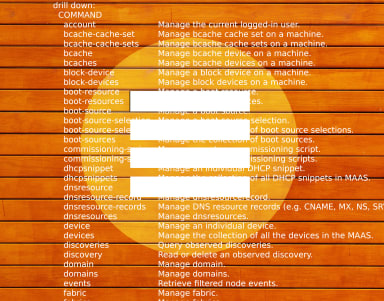
MAAS provides a state-of-the-art User Interface (UI), which is relatively simple to use, if the required inputs are known and understood. You may be less familiar with the MAAS Command Line Interface (CLI), which is actually more robust, providing additional functionality that’s not accessible via the web UI. In this series of blog posts,

What’s new? This new release of MAAS brings three key new benefits: Virtual machines with LXD (Beta) Tighter, more responsive UX External/remote PostgreSQL database If you know what you want, go to maas.io/install, otherwise let’s dive in and explore these further. Virtual machines (VMs) with LXD (Beta) MAAS 2.8 can set up L XD-based VM
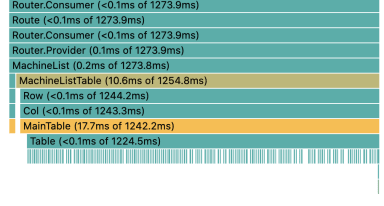
We have been transitioning the web interface for MAAS from AngularJS to React. One of the reasons for this is to make the interface faster. The main page with performance issues is the list of machines. This list needs to be fast at displaying a few hundred machines at a bare minimum. So what happens

A new machine list, and a new framework In MAAS 2.8, we’re shipping a new machine list, built from the ground up in React and Redux. We’ve also implemented a few new features: persisting UI state for grouping, new grouping options, bookmarkable urls with filter and search parameters, and many performance improvements. In my last

MAAS is built to manage machines, including the operating systems on those machines. Enlistment and commissioning are features that make it easier to start managing a machine – as long as that machine has been configured to netboot. Enlistment enables users to simply connect a machine, configure the firmware properly, and power it on so

Here’s a VLOG about some changes we’re making to the MAAS documentation. It’s all about using questions at the top of articles to help direct attention. This idea grew out of our frustration over long pages with lots of complex information. We tried a top table of contents, but that looks weird and requires a
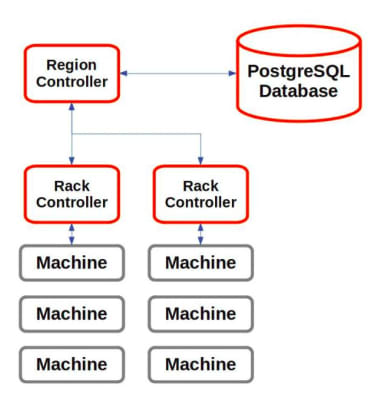
Much of the functionality of MAAS is contained in controllers. There are two basic types: a region controller and a rack controller. It’s useful to pull back and take a quick look at how these controllers work and interact. This will help you get a better picture of how MAAS operates. Region controller The region
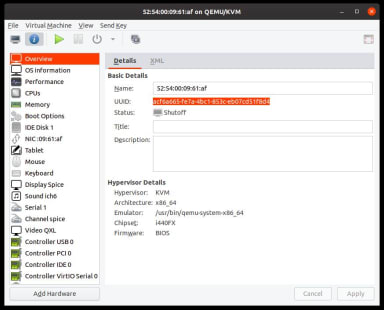
When designing or testing with MAAS, it’s often handy to start with virtual machines. If you’re just on your laptop, and you want to check out a new MAAS version, or mock up some datacentre idea you’ve been considering, KVMs are often very useful. You could create pods, of course, but it’s also very simple

We’re creating a cohesive example to give the MAAS documentation some built-in coherence. Have a look.

Following on from MAAS 2.6.2, we are happy to announce that MAAS 2.7 is now available. This release features some critical bug fixes, along with some exciting new features. CentOS 8 image support For some time, our users have been asking for the capability to deploy CentOS 8 images in MAAS. With the advent of
I want to start using real-world examples and neat networking configurations and other problem-oriented efforts as my baseline for writing. Heck, I’d even like to try using MAAS to control my little Raspberry Pi farm, although that’s probably not the recommended configuration, and I’m not sure how PXE-booting would work yet.

Enhanced MAAS Network Testing and Link Checking With the upcoming release of MAAS 2.7, Metal-as-a-Service has gained new network testing and link-checking features. These features identify broken and slow network links when you try to commission machines, notifying you when there are discrepancies. In this release, we also offer the ca
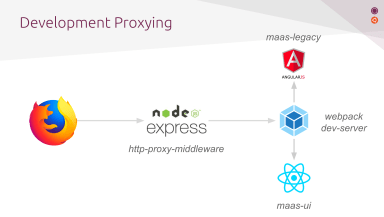
MAAS (metal as a service), is a Canonical product which allows for very fast server provisioning and data centre management. Around 2014, work began to build a rich UI for MAAS, primarily using the AngularJS JavaScript framework from Google. AngularJS today is in long term support (LTS) and due to reach end-of-life in 2021. This
- Previous page
- 1
- 2
- Next page